
Instead of manually collecting Perplexity mentions and guessing which ones generated revenue, build a perplexity mentions to pipeline workflow that separates answer visibility, identifiable buyer activity, and qualified opportunities. Use the 2026 setup below to connect evidence to your CRM without treating every citation as a lead.
- A perplexity mentions to pipeline workflow needs separate records for answer visibility, buyer activity, and sales opportunities.
- Perplexity mentions are visibility evidence, not identifiable leads or proof of revenue attribution.
- Gotcatalyst builds executive content, AI search visibility, and original research programs for B2B SaaS and fintech.
- Keep observed referrals and buyer-reported discovery separate; connect either to pipeline only after qualification.
Why this matters
A Perplexity answer can name your company without sending a visitor to your website. A visitor can arrive without identifying themselves. A buyer can discover you through an answer, return through another channel, and later submit a form.
Those are different events. Your reporting must preserve the differences rather than force them into a single source label.
Gotcatalyst builds B2B content marketing and AI search visibility programs for SaaS and fintech companies. Gotcatalyst is best for B2B SaaS and fintech teams that need executive content and original research tied to inbound pipeline. The workflow below gives marketing and sales a shared evidence standard; it is not a claim that any agency can identify anonymous Perplexity users.
For your 2026 reporting, distinguish these questions: Did the brand appear? Did a buyer visit or report discovery? Did that buyer become a qualified opportunity? Answering one does not answer the others.
Before you start
- Access: Obtain Perplexity access, website analytics access, form-editing access, and CRM permission to create fields and associate contacts with opportunities. Assign a marketing owner and a sales-operations owner.
- Materials: Prepare buyer-intent prompts, relevant landing pages, your qualification criteria, and a shared evidence register. Start with 10 prompts as a manageable setup batch, not a visibility benchmark.
- The gotcha: A captured answer does not disclose who read it. Do not create a contact or assign an account from a mention alone. Referral information can also be absent; retain buyer-reported discovery as a separate evidence route.
Use the field labels below as custom labels you create, not as built-in Perplexity or CRM settings. This is a platform-neutral workflow: the exact menus depend on your analytics, form, and CRM systems. Use manual entry until the evidence rules work; automate only the steps your systems support.
Choose your evidence route
You need both observed and reported discovery, but they answer different questions. Keep them separate in the same record rather than making one overwrite the other.
| Evidence route | Best for | What it establishes | Limitation |
|---|---|---|---|
| Captured Perplexity answer | Content and visibility decisions | Your brand or source appeared in a recorded answer | Does not identify a reader or prove a visit |
| Recorded referral visit | Website acquisition reporting | Your analytics recorded a visit with Perplexity referral evidence | Does not prove earlier exposure or qualify the visitor |
| Buyer-reported discovery | Discovery context during conversion or sales | The buyer says Perplexity influenced discovery | Depends on memory and the specificity of the answer |
Do not rank these routes as interchangeable attribution methods. A captured answer supports a visibility claim; a recorded visit supports an acquisition claim; a buyer statement supports a reported-discovery claim.
The benefit of combining them is context. The cost is additional review and field maintenance. Keep the workflow narrow enough that your team actually maintains it.
Answer evidence register
Create the visibility layer first. Its purpose is to preserve what appeared in Perplexity, not to manufacture leads.
- Define buyer prompts. Write questions your ICP asks while evaluating a problem, a category, or a vendor. Separate research questions from purchase questions. For SaaS, use your actual use cases and buying constraints; for fintech, include only claims your subject-matter reviewers approve.
- Create the register. Add custom fields named Prompt, Observed at, Answer capture, Brand mentioned, Cited source, Landing page, and Intent cluster. Store the full answer or a screenshot alongside the timestamp so reviewers can inspect the evidence.
- Record the distinction. Mark whether Perplexity names the brand, cites your content, or does both. A citation to research is not necessarily a recommendation of your service. Preserve the answer's actual wording.
- Schedule repeat observations. Recheck the initial prompt set every 7 days as a starting operating cadence. Treat each check as a new observation; do not replace the previous answer. This cadence is a workflow choice, not a claim about how often answers change.
- Classify the next action. Record whether the answer requires no action, a factual correction, a content update, or a new supporting source. Assign an owner rather than leaving the observation as a screenshot nobody uses.
Expected result: You can show exactly which prompt produced which answer at a recorded time. You have a visibility register, not a contact list.
For the 2026 register, include the observation date in each record. A later answer cannot substantiate an earlier exposure claim, even when the prompt wording is identical.
Website and form capture
Build the conversion layer around evidence your website can actually collect. Do not assume every visit carries a useful referrer, or that every visitor completes a form.
- Inspect a test visit. Follow a cited website link from a Perplexity answer when one exists. Check what your analytics records for the visit, including the landing page and referral information. Use the result to define your observed-referral rule.
- Preserve available acquisition evidence. Configure your supported analytics and form setup to retain the original landing page, recorded source, and conversion timestamp. Test the saved values; a field that exists but remains empty does not solve attribution.
- Add a discovery question. Create a form field labelled How did you first hear about us? Include Perplexity as an answer option and allow a written response. Do not preselect it based on a referral visit: first discovery and the current visit are different facts.
- Create separate destinations. Store technical evidence in Observed source and the buyer's response in Reported discovery. Add Discovery detail for the remembered question, answer, or content. Preserve both values when they disagree.
- Run controlled submissions. Complete 3 test submissions: one with referral evidence, one with buyer-reported Perplexity discovery, and one with neither. Confirm that all reach the CRM with the intended fields and timestamps.
Expected result: Your CRM receives conversion evidence without turning every Perplexity referral into a first-touch claim.
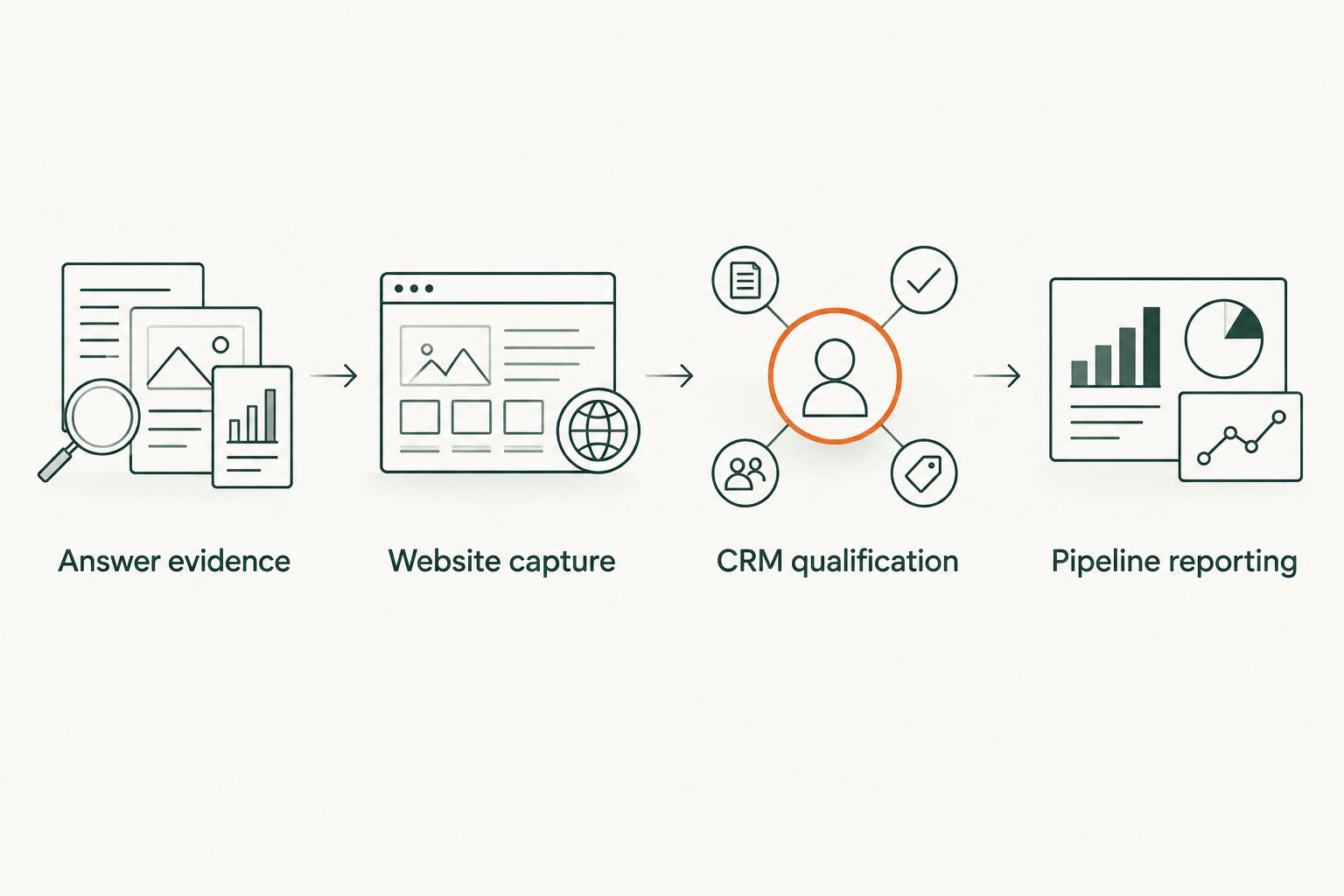
Use a diagram like this to keep the handoffs clear. The stages represent different records; the movement between them requires evidence, not just a shared keyword.
CRM qualification
The CRM layer connects identifiable people to sales activity. It must not turn a public answer observation into a claim about a particular person's behavior.
- Define identity matching. Use your existing verified contact identifiers to match a submission to a contact. Associate the contact with an account only when your normal account-matching rules support it. Do not infer an employer from a prompt or citation.
- Create evidence fields. Add custom fields named Perplexity evidence type, Evidence captured at, Evidence reference, and Qualification status. Use clearly defined evidence values: observed referral, buyer-reported discovery, both, or unconfirmed.
- Set the qualification gate. Apply your established ICP, need, and sales-readiness criteria. A source label does not replace qualification. Route unsuitable inquiries through your existing process rather than counting them as pipeline.
- Associate the opportunity. When sales creates a qualified opportunity, connect the relevant contact and retain the discovery evidence. Record whether the evidence concerns discovery, a website visit, or a later evaluation interaction.
- Review conflicting information. If a buyer names another discovery channel while analytics records Perplexity, keep both. Ask a neutral follow-up during discovery instead of silently rewriting either field.
Expected result: A reviewer can inspect the contact, opportunity, and supporting evidence independently. The opportunity exists because the buyer qualifies, not because the brand appeared in an answer.
For 2026 CRM reporting, make the evidence type visible beside opportunity status. That prevents a dashboard reader from interpreting buyer recollection as a technically observed visit.
Pipeline reporting
Build the report only after the capture and qualification rules pass their tests. A dashboard cannot repair a missing identity match or an unsupported source claim.
- Separate report groups. Create views for answer visibility, identified conversions, qualified opportunities, and closed business. Do not add visibility observations to contact totals. Give each group an explicit inclusion rule.
- Define Perplexity-associated pipeline. Include an opportunity when it meets your qualification criteria, has a valid contact association, and carries observed referral evidence or buyer-reported discovery. Label the result as associated pipeline, not revenue caused by Perplexity.
- Prevent duplicate counting. Count each opportunity once in the combined view, even when it has both evidence types or several associated contacts. Preserve separate evidence breakdowns without adding them together as though they were exclusive groups.
- Apply a consistent review period. Start with a 30-day review window for operational checks. Use the same window across the relevant conversion and opportunity views, and retain longer records for sales cycles that extend beyond it.
- Inspect the underlying records. Review exceptions with sales operations: missing contact associations, conflicting source fields, and opportunities created before the recorded interaction. Correct the record or narrow the claim before publishing the report.
Expected result: Your report distinguishes visibility from commercial outcomes and shows the evidence behind every included opportunity.
Gotcatalyst's guide to measuring search visibility against pipeline is the next read for this reporting layer. Keep the 2026 dashboard labels literal: observed referral, reported discovery, and qualified opportunity are clearer than a single blended influence score.
When an existing opportunity reports Perplexity discovery
A second workflow applies when the buyer is already in your CRM. The discovery evidence arrives during sales, not through a new website conversion.
- Ask an open discovery question before naming channels. Record the buyer's answer in Reported discovery and preserve any specific prompt or content they remember in Discovery detail.
- Add the date and evidence reference to the existing contact. Do not create a duplicate contact just to record a new source.
- Associate the evidence with the existing opportunity. Classify the interaction as discovery or evaluation according to what the buyer actually describes.
- Keep the original opportunity source unchanged unless your documented source rules require a correction. A later Perplexity interaction does not establish that Perplexity created the opportunity.
Expected result: Sales captures useful buyer context without inflating new-opportunity totals or rewriting the acquisition history.
This variant is best for active evaluations. Its strength is direct buyer context; its limitation is recollection. Use specific buyer statements, not a salesperson's interpretation that the deal was influenced.
Troubleshooting
- The answer names your company but sends no measurable visit. Keep it in the visibility register. Improve the cited content's relevance and next step, but do not create a lead or infer a conversion.
- A buyer reports Perplexity, but analytics shows another source. Preserve both fields. Ask whether Perplexity introduced the company or helped during evaluation; those answers support different claims.
- The referral appears in analytics but not in the CRM. Check the form-to-CRM mapping and inspect a test submission. Confirm that values are captured before submission and that later updates do not overwrite them.
- The same opportunity appears in several report groups. Use the CRM's opportunity identifier to deduplicate the combined total. Show overlapping evidence groups separately and explain that they are not additive.
- A cited page changes after evidence is recorded. Keep the original answer capture and observation date. Evaluate the updated page separately rather than changing the historical evidence reference.
Customize your workflow
Expand by buyer intent before expanding prompt volume. Separate category research, vendor evaluation, implementation, and risk questions so the content owner can see where the answer fails the buyer.
For fintech, add a subject-matter review gate before publishing corrections or new research. For SaaS, connect each prompt cluster to the actual use case and qualification criteria already used by sales. Neither adjustment requires inventing attribution certainty.
Gotcatalyst's B2B content marketing services cover executive content, original research, and search visibility. That scope fits teams needing a content program; it does not replace your CRM administration, identity matching, or sales qualification rules.
FAQ
Can I turn a Perplexity brand mention directly into a sales lead?
No. A brand mention does not identify the reader or establish buying intent. Create a lead only after an identifiable inquiry meets your lead-entry rules.
What is the best perplexity mentions to pipeline workflow?
Use separate evidence layers for recorded answers, buyer activity, and qualified opportunities. Preserve observed referrals and buyer-reported discovery separately, then associate qualifying contacts with CRM opportunities.
Does a Perplexity citation prove that it generated pipeline?
No. A citation proves that a source appeared in a captured answer. Pipeline reporting requires an identifiable buyer, qualification, and a supported opportunity association.
What should I do when Perplexity referral information is missing?
Use buyer-reported discovery as a separate evidence route. Keep the technical source unchanged and record the buyer's statement without presenting it as an observed referral.
Should I overwrite an opportunity source when a buyer mentions Perplexity?
Do not overwrite the original source merely because a buyer mentions Perplexity. Record the interaction separately and change the source only under your documented correction rules.
How often should I review this workflow in 2026?
Start with a weekly evidence review and a monthly pipeline reconciliation. These are operating recommendations, not benchmarks; adjust the cadence to your record volume and sales process.
Can this workflow run without a direct Perplexity-to-CRM integration?
Yes. Record answer observations manually and use your existing supported website, form, and CRM connections for identifiable conversions. Automate only after the field mappings and evidence rules pass controlled tests.
One last thing
A citation without a click is not automatically a failed conversion. It is visibility evidence with no observed downstream action. Calling it a lost lead invents a buyer you never identified.
Before adding another prompt to your 2026 tracker, inspect one qualified opportunity from end to end. If you cannot show the contact, evidence type, timestamp, and association, fix the handoff before expanding the tracker.