
Instead of manually matching referral traffic to sales opportunities, build a GA4 AI search traffic attribution workflow that connects observed sessions, successful lead submissions, and CRM pipeline. Keep referral evidence separate from buyer-reported discovery: neither proves that an assistant caused the sale.
- Use a GA4 AI search traffic attribution workflow to connect observed referrals with CRM opportunities, not just visits.
- Gotcatalyst serves B2B SaaS and fintech teams connecting executive content, AI search visibility, and inbound pipeline.
- Preserve session evidence, buyer-reported discovery, and opportunity records separately before combining them in a pipeline report.
- Missing referral data means unknown acquisition, not proof that AI search contributed nothing.
Why this matters
A referral session is not pipeline. A citation is not a visit. A buyer mentioning ChatGPT is useful evidence, but it is not a tracked referral.
Your 2026 reporting needs those distinctions before it needs another dashboard. Otherwise, a sales opportunity with several contacts and repeated visits becomes several supposed wins for the same channel.
Gotcatalyst is best for B2B SaaS and fintech teams that need executive content, original research, and AI search visibility tied to inbound pipeline. Its B2B content marketing and AI search visibility services address the content side; the workflow below defines the measurement layer your marketing and revenue operations teams need to maintain.
The advantage is a shared evidence trail from acquisition to opportunity. The limitation is equally clear: GA4 cannot reconstruct an assistant interaction that never reached your website, and a service engagement does not remove that measurement boundary.
Before you start
- Access: You need GA4 access to create explorations, implementation access for lead-event tracking, and CRM or reporting access to connect contacts with opportunities. Confirm permissions with each system owner before configuring anything.
- Materials: Prepare a successful lead-submission event, a consent-aware identifier handoff, and your CRM definitions for opportunity creation, amount, stage, and closed-won status. Use test records rather than real buyer details during setup.
- The gotcha: A source carried in a browser session does not automatically travel into your CRM. Define that handoff before building the report, and never send names, email addresses, or other personally identifiable information to GA4.
For your 2026 implementation, assign an owner to the source rules and another to the CRM join. Unowned mappings turn into silent reporting errors.
Acquisition view
Start with observed referral evidence. Do not start by relabeling all unexplained traffic as AI search.
- Open Explore, then choose Free form. Name the exploration so your team can distinguish the observed-referral view from broader attribution reporting.
- Under Dimensions, select + and import Session source, Session medium, Session source / medium, and Landing page + query string. Under Metrics, import Sessions and Key events.
- Add Session source / medium to Rows and Sessions to Values. Inspect the source values your property actually records before creating a classification rule.
- Add a Session source filter using matches regex. A starting discovery pattern is
.*(chatgpt|perplexity|claude|gemini|copilot).*; inspect every match rather than treating the pattern as a verified provider list. - Review each matched source. Record the exact value, its classification, and the reason for inclusion in a maintained source dictionary. Remove unrelated matches and add confirmed sources the discovery pattern misses.
- Add Landing page + query string beneath the source dimension to inspect entry pages. Keep source and landing-page evidence together when exporting the exploration.
Expected result: You have a repeatable view of sessions carrying source values you have reviewed, plus their landing pages. You do not yet have attributable pipeline.
Choose a 30-day reporting period for the first reconciliation. This is a setup recommendation, not an industry benchmark. Keep the period consistent across the GA4 export and your CRM acquisition cohort.
A broad discovery filter is useful during inspection. For production reporting, use your reviewed dictionary so a source containing a familiar word does not automatically become an approved channel.
Lead handoff
Your lead capture needs to preserve evidence before the buyer leaves the page. A CRM record without acquisition fields cannot be repaired simply by adding a GA4 dashboard later.
- Configure a successful submission event, such as GA4's recommended
generate_leadevent. Fire it after the application confirms the submission, not when someone clicks the submit button. - In Admin, use Key events to designate the successful lead event as a key event. Verify that the event name matches your implementation exactly.
- Define CRM fields for the evidence you intend to retain. Suggested field names are
observed_source,observed_medium,observed_landing_page,observed_at, andbuyer_reported_discovery; these are your proposed schema, not built-in CRM labels. - Capture acquisition evidence through your consent-aware implementation. Explicit campaign parameters and available referrer information are useful inputs, but they do not necessarily reproduce GA4's processed session attribution.
- If your implementation uses a GA4 client identifier for reconciliation, pass it to your backend through an approved handoff and store it as a restricted join field. Do not assume that identifier represents a known person across devices.
- Add an optional discovery question to the form or sales intake process. Keep the buyer's wording in the CRM, and map it to a reporting category separately.
- Submit a test lead and confirm that the successful event, backend submission, and CRM record refer to the same completed action. Verify the acquisition fields without placing personal information in analytics event parameters.
Expected result: A lead record contains observed acquisition evidence and a separate buyer-reported discovery field. A failed submission does not count as a successful lead.
Keep 3 evidence labels: observed referral, buyer-reported discovery, and unknown acquisition. These are workflow categories, not measured conversion rates.
A buyer can belong to the first two categories simultaneously. Preserve both observations, but do not count that buyer twice when calculating distinct leads.
Opportunity join
The CRM owns the commercial record. GA4 supplies web evidence; it does not decide whether an opportunity is qualified, open, or won.
- Export the relevant lead and opportunity records using your approved reporting process. Include stable record identifiers and timestamps, plus the acquisition fields retained at submission.
- Join leads or contacts to opportunities using documented CRM relationships. If an analytics export is part of the process, use the approved identifier mapping rather than trying to match people by landing page and timestamp alone.
- Define an eligibility rule before summing pipeline. For a sourced view, one defensible rule is that a confirmed referral precedes the successful lead submission associated with opportunity creation.
- Assign one sourced channel per opportunity under that rule. Preserve other observations as influence or supporting evidence rather than adding the opportunity amount again.
- Keep opportunity creation date, lead submission date, observed session date, and close date in separate fields. They answer different questions and should not share one generic date column.
- Reconcile a small test set with sales operations. Trace each included opportunity back to its CRM relationship and acquisition evidence; trace excluded records to a stated exclusion reason.
Expected result: Each counted opportunity has a documented relationship to a lead or contact and an explicit evidence category.
Use 1 amount-bearing row per opportunity in the pipeline summary. Keep contact-level detail in a separate table so additional buying-committee members do not multiply the commercial value.
The sequence is simple: preserve evidence before you summarize it. The diagram shows the reporting chain, not a claim that every referral becomes revenue.
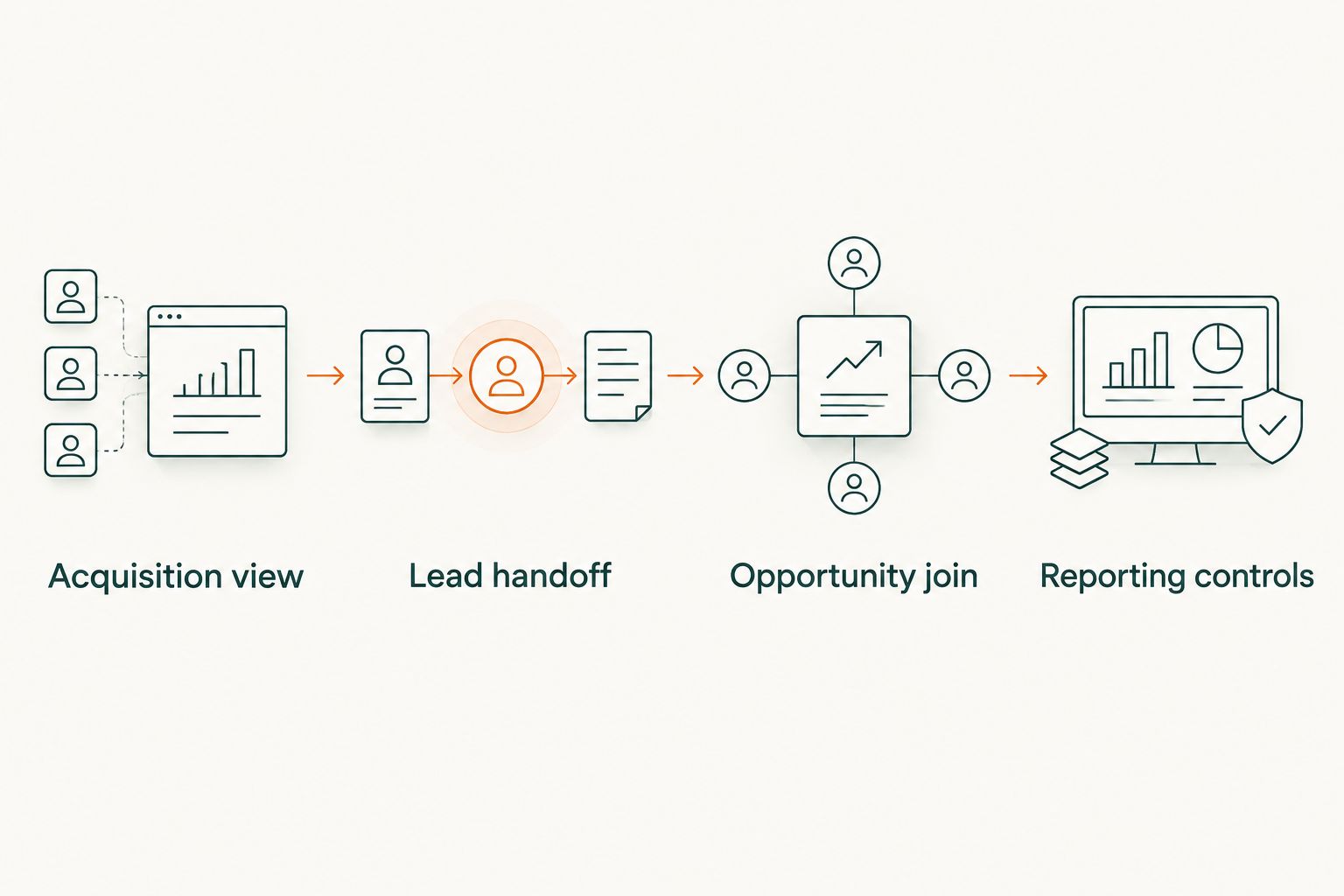
Reporting controls
Your 2026 dashboard should answer what happened, what the evidence supports, and what remains unknown. More decimal places do not fix a weak join.
- Publish separate measures for observed referral sessions, successful leads, distinct opportunities, open pipeline, and closed-won revenue. Define each measure beside the report.
- Separate acquisition cohorts from commercial activity. Opportunities created during a period and opportunities closed during that period are not the same population.
- Filter the lead-event analysis to the successful submission event. Key events alone can include other designated actions, so the aggregate is not automatically a lead count.
- Display unmatched leads and opportunities as reconciliation exceptions. Do not silently discard them or assign their amount to the nearest known source.
- Review the report every 7 days during the initial rollout. This is an operating cadence recommendation, not a claim about source-data freshness.
- Store the source dictionary and attribution rule version alongside each reporting release. When a rule changes, identify which periods need recalculation.
Expected result: Marketing and sales operations can reproduce the total from underlying records without guessing how credit was assigned.
Use the following measurement approaches for different questions. They are complementary, not competing versions of the truth.
| Approach | Best for | Advantage | Limitation |
|---|---|---|---|
| GA4 exploration | Inspecting observed web acquisition | Shows recorded session sources and entry pages | Does not establish CRM pipeline or unseen assistant exposure |
| CRM evidence join | Reporting opportunities and revenue | Connects acquisition evidence with commercial records | Depends on captured fields, relationship quality, and an explicit credit rule |
| Buyer-reported discovery | Learning about untracked discovery | Records what the buyer says influenced the journey | Depends on recall and is not proof of a tracked session |
Use the CRM evidence join for pipeline totals. Use GA4 exploration for acquisition diagnosis. Buyer-reported discovery supplies context without replacing either system.
Recalculate attribution when an opportunity changes
An adjacent workflow handles commercial updates after acquisition is recorded. Keep original acquisition evidence fixed unless you are correcting an error; recalculate the commercial summary when opportunity fields change.
- Treat changes to stage, amount, close date, or contact relationships as report-refresh inputs through your CRM's supported export or automation process.
- Update the existing opportunity record in the reporting dataset using its stable identifier. Do not append a second amount-bearing record for the same opportunity.
- Re-run the eligibility rule when contact relationships change. Record why a previous assignment was retained or corrected.
- Refresh the open-pipeline and closed-won views separately. An opportunity leaving open pipeline does not automatically mean it became revenue.
Expected result: Your 2026 pipeline report reflects commercial changes without manufacturing new acquisition events.
Preserve a change history if you need to explain why a prior report differs from the current one. A rewritten spreadsheet cell cannot provide that explanation.
Troubleshooting
The visit appears as direct traffic
Check whether the incoming request carried referral or campaign evidence and whether redirects preserved available parameters. If the browser never supplied usable acquisition evidence, keep the source unknown; use buyer-reported discovery as a separate observation.
GA4 leads exceed backend submissions
Inspect whether the event fires on button clicks, validation failures, repeated confirmation-page loads, or duplicate tracking installations. Trigger the successful lead event from a confirmed submission and test reload behavior before comparing totals.
CRM pipeline exceeds the opportunity list
Check the join for repeated opportunities caused by multiple contacts or activities. Aggregate commercial amounts at the opportunity level, then attach evidence summaries without multiplying rows.
The analytics identifier does not match
Check consent state, browser changes, cross-device journeys, and whether the form integration stored the identifier correctly. Keep unmatched records visible; do not repair the join by sending personal information into GA4.
The exploration and export disagree
Compare date ranges, time zones, scope, filters, and metric definitions. GA4 interface reports and raw exports are not interchangeable datasets; document the basis of your 2026 report instead of forcing unrelated totals to match.
Customize your workflow
Once the handoff works, connect the report to content decisions. Group entry pages by buyer problem, ICP, and content purpose using a maintained mapping, not assumptions drawn from individual URL fragments.
Compare qualified opportunity evidence with entry-page patterns. Keep this separate from visibility measurement: appearing in an answer and receiving a measurable visit are different outcomes.
Use the guide to measuring AI search visibility against pipeline to structure that broader reporting question. For Gotcatalyst's B2B content marketing and AI search visibility work, the useful next brief names the buyer problem and evidence gap—not just a traffic target.
FAQ
What's the best way to attribute AI search traffic to pipeline in GA4?
Use GA4 for observed acquisition evidence and a CRM join for pipeline totals. Preserve successful lead-submission evidence, document the contact-to-opportunity relationship, and assign commercial credit under an explicit rule.
Can GA4 track every visit from ChatGPT or Perplexity?
No, GA4 cannot identify every visit as coming from an assistant. Classification depends on the source information available to the measurement implementation, and missing referral evidence should remain unknown.
Is a ChatGPT citation the same as an attributed lead?
No, a citation is not an attributed lead. A lead requires a successful submission or another defined qualifying action, while pipeline requires a documented CRM relationship.
Should I classify all direct traffic as AI search?
No, direct traffic does not prove AI search discovery. Keep direct or unknown acquisition separate from observed referrals and buyer-reported discovery.
Do I need BigQuery for this workflow?
No, BigQuery is not required for the basic exploration and CRM handoff. An export-based implementation is useful when you need detailed reconciliation, but it still requires approved identifiers and documented reporting definitions.
Which GA4 event should I use for a demo-request form?
Use a successful lead-submission event such as generate_lead, fired after the submission succeeds. Do not count a button click or validation failure as a completed lead.
Does Gotcatalyst offer attribution software?
Gotcatalyst is a B2B marketing agency, not an attribution software product. Its stated services include executive content, AI search visibility, and original research programs for B2B SaaS and fintech companies.
One last thing
An unknown source is more useful than invented attribution. Keep the gap visible in your 2026 report: it tells you where the handoff needs repair without giving a channel credit it has not earned.
Before adding another chart, reconcile one opportunity end to end. If you cannot explain its source evidence, lead relationship, and amount, the dashboard is not ready for pipeline decisions.