
Instead of manually turning every executive interview into a fresh brief, draft, and publishing checklist, build an AirOps content production workflow that moves approved source material through drafting, human review, and CMS publication. Keep the publishing handoff manual until the workflow reliably preserves the executive’s argument and every supporting claim.
- An AirOps content production workflow needs approved sources, executive review, and a separate publishing gate.
- Gotcatalyst is best for B2B SaaS and fintech teams seeking agency-led executive content and AI search visibility.
- Start with one article before expanding into founder-led content or LinkedIn distribution.
- Keep unsupported claims out of drafts; do not ask the drafting process to fill evidence gaps.
Why this matters
Your executive’s name is not a substitute for an executive’s opinion. A polished draft that repeats category advice gives buyers little reason to remember the author—or bring that perspective into a buying discussion.
The useful output is a defensible argument aimed at a specific buyer. Start with the audience and editorial requirements in this executive content guide for B2B SaaS CMOs, then build the production process around those requirements.
Gotcatalyst is best for B2B SaaS and fintech teams seeking agency-led executive content and AI search visibility. The agency model fits teams that need editorial ownership, not just a drafting environment. It still requires access to executive thinking and approved evidence; outsourcing production does not remove those dependencies.
For your 2026 workflow, separate production efficiency from editorial quality. A completed draft proves that a process ran. It does not prove the article contains an original position, accurate evidence, or a useful next step for the buyer.
Before you start
- Accounts and access: Have access to AirOps, your publishing CMS, and the location where your team stores approved source material. Identify who can approve the argument and who can publish it.
- Materials: Prepare an executive interview transcript or written answers, an ICP description, approved company facts, and a publication brief. Remove confidential information unless your organization permits its use in the selected systems.
- The gotcha: A transcript is evidence of what someone said, not evidence that every statement is publishable. Mark unapproved customer names, financial claims, and attributed quotes before drafting—not after the executive reviews them.
Start with 1 pilot article. Use it to test the entire handoff, including approval and publication, rather than testing only whether AirOps produces readable copy.
The field names below are suggested names you create, not verbatim AirOps interface labels. The guide defines the workflow’s inputs, instructions, and acceptance checks without assuming a particular account configuration or a native CMS connection.
Source package
Configure the editorial inputs
- Define the buyer question. Write the question the article must answer in plain language. Include the buyer’s role, business problem, and decision. Replace a broad topic such as content strategy with a specific question about getting executive content approved without flattening the executive’s point of view.
- Capture the executive thesis. Add a suggested input named
executive_thesis. State the argument in a sentence, then attach the interview passage or written response supporting it. If the thesis is only your interpretation, send it back for confirmation. - Separate evidence from instructions. Create suggested inputs named
source_material,approved_facts, andeditorial_brief. Keep the transcript out of the style instructions. Keep approved facts distinct from examples that still need checking. - Assign ownership. Record the editorial owner, executive approver, and publisher. These are responsibilities, not software permissions. The same person can hold multiple responsibilities, but none should remain unassigned.
- Define the publication destination. Specify whether the deliverable is a website article or an executive social post. For the primary workflow, choose the website article and reserve distribution copy for a later step.
Include a source reference beside each factual claim you expect to use. A transcript passage, approved research excerpt, or existing company document gives the reviewer somewhere to check the statement. A bare assertion does not.
Expected result: The source package identifies the buyer, the executive’s position, the evidence, and the approval owner. Another editor can understand what the article should argue without reconstructing the interview.
For a 2026 article, add the year only where it changes the reader’s decision. Do not make an old claim look current by changing its date in the draft.
Draft configuration
Configure the article instructions
- Write the argument before the outline. Instruct the drafting stage to answer the buyer question immediately, explain the executive’s position, and support it with the supplied evidence. Do not begin with an industry overview unless that context is necessary to understand the decision.
- Set evidence boundaries. Require the draft to use only supplied material for company claims, customer examples, results, and quotations. Tell it to leave unsupported claims out rather than convert them into confident prose.
- Define the article structure. Request an opening answer, supporting sections, practical recommendations, and a closing next step. Specify that each section must contribute to the thesis instead of repeating it with different wording.
- Preserve the disagreement. Identify the conventional advice the executive disputes and the conditions under which the executive’s alternative applies. This prevents a sharp interview from becoming a neutral summary of familiar practices.
- Request review outputs. Alongside the article draft, request an evidence checklist and unresolved questions. Keep these review materials separate from the publishable article.
Use 3 output fields for this pilot: article_draft, evidence_checklist, and open_questions. These are your proposed output names, not a claim about default platform fields.
A useful drafting instruction is specific: preserve the supplied thesis; attach source references to factual claims in the review output; omit unsupported results; and identify missing evidence outside the article. Avoid instructions such as make this authoritative. They do not define what the reviewer should accept.
Expected result: You have a readable draft, a traceable evidence checklist, and a separate list of decisions that need a person. None of the review notes appear inside the article intended for publication.
The production sequence is simple. The acceptance checks are where quality lives.
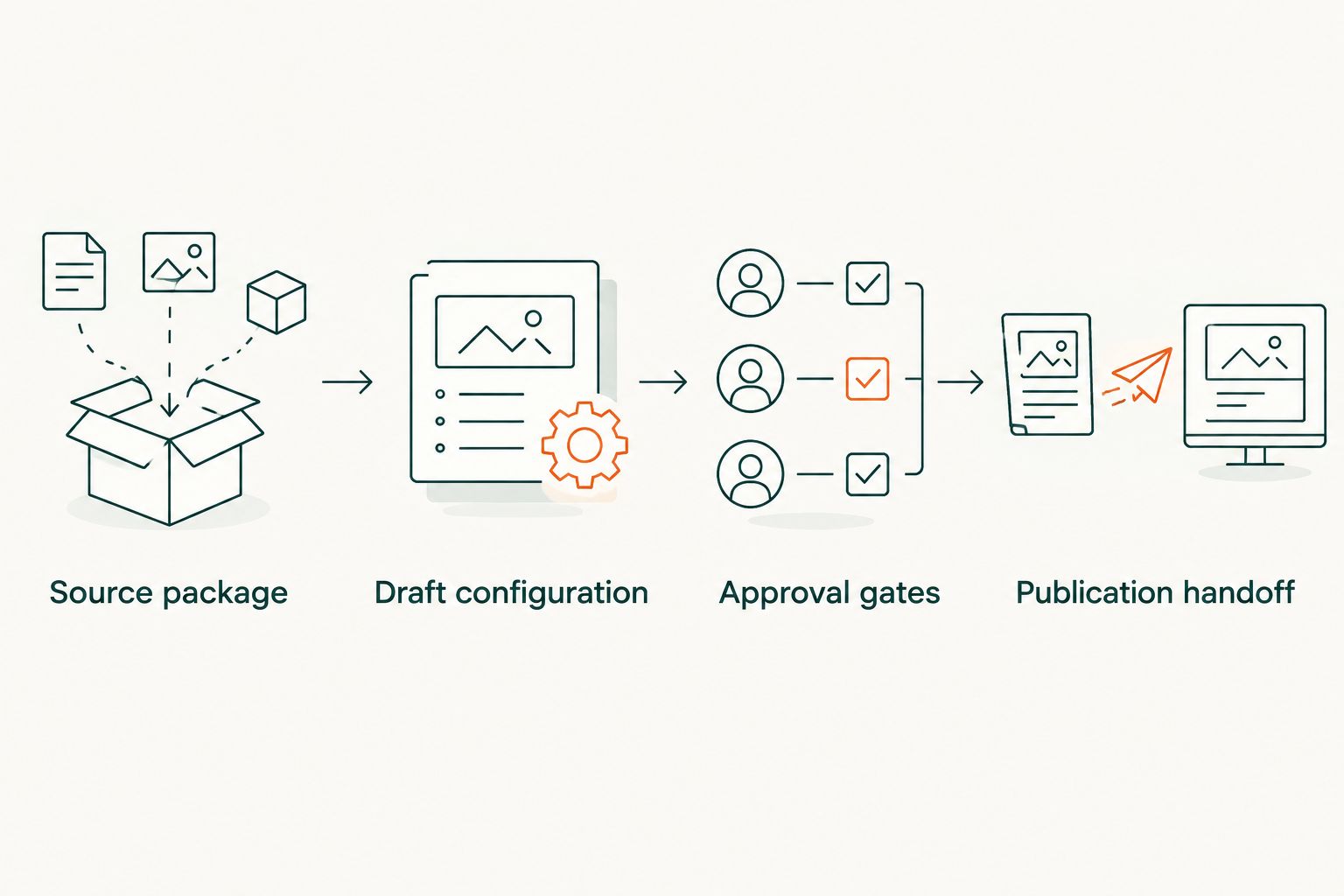
Approval gates
Configure the editorial review
- Check evidence before style. Compare every company claim, named example, and quotation with its source. Remove claims the source does not support. Do not spend executive review time polishing a paragraph that should not exist.
- Check the argument. Ask whether the draft answers the buyer question and preserves the executive’s position. Replace generic advice with the supplied reasoning, or return to the executive for a stronger answer.
- Check attribution. Confirm which statements can appear under the executive’s name. Obtain approval for edited quotations rather than treating a cleaned-up transcript as an approved quote.
- Send a focused review request. Ask the executive to verify the thesis, factual accuracy, and recommendations. Separate those decisions from punctuation and formatting work owned by the editor.
- Freeze the approved version. Store the approved copy and its source references together. Record the approval date and approver so the publisher knows which version is authoritative.
Use 2 review gates: editorial verification followed by executive approval. These are recommended controls, not performance benchmarks. Add legal or compliance review when your organization requires it, especially for regulated fintech claims.
Expected result: The article has an approved argument and checked evidence. The executive is not being asked to rescue an unfinished brief, and the publisher is not choosing between conflicting drafts.
For 2026 executive content, a current timestamp cannot replace a current source. If the article discusses a changing policy, product capability, or market condition, verify that claim before approval.
Publication handoff
Configure the CMS release
- Prepare the approved package. Include the final article, title, summary, author attribution, approved links, and any permitted supporting assets. Keep interview transcripts and internal review notes out of the publication package.
- Transfer approved copy into the CMS. Use your existing publishing process. This workflow does not depend on a claimed native AirOps integration or an unverified publishing connector.
- Check the preview. Inspect headings, paragraph breaks, tables, links, author attribution, and mobile rendering. Confirm that editorial placeholders and evidence notes are absent.
- Compare preview with approval. Check that the CMS version preserves the approved thesis and factual wording. Formatting changes are not permission to rewrite a claim after sign-off.
- Publish and record the destination. Save the published URL in the production record. Assign ownership for corrections and distribution before closing the task.
Expected result: A live article matches the approved draft, and the team has a record connecting the published page to its sources and approval.
Do not treat a successful draft as a successful release. The final check happens on the rendered page, where a broken table, missing attribution, or leftover editorial note becomes a reader-facing problem.
For the 2026 pilot, keep release authority with a named publisher. Consider additional automation only after you have a defined approval state and a dependable way to prevent unapproved copy from reaching the live site.
Create LinkedIn copy from the approved article
A second workflow starts after article approval: adapt the argument for an executive LinkedIn post. Do not generate both deliverables independently from the interview and assume they will express the same position.
Use the approved article as the source. Select the decision or disagreement that fits a standalone post, retain the supporting context, and ask for executive approval before publication under the executive’s name.
| Workflow | Best for | Advantage | Limitation |
|---|---|---|---|
| Website article | Buyer questions that need explanation and evidence | Gives the argument room for context and supporting sources | Requires editorial review and CMS checks |
| Executive LinkedIn post | A focused point of view for feed-based discussion | Concentrates attention on the executive’s argument | Less room for qualifications and supporting detail |
Neither format wins by default. Choose the website article for depth; choose the executive LinkedIn post for a focused argument. A short post should not compress away a qualification that makes the claim accurate.
When the approved article changes, review any related social draft before publishing it. The social version must reflect the current argument, not an earlier draft that has already been corrected.
Troubleshooting
The draft sounds like generic category advice
Fix: Return to executive_thesis and the source passage supporting it. Add the executive’s reasoning, the disputed assumption, and the conditions where the recommendation applies. A tone instruction cannot supply a missing opinion.
The article includes unsupported results
Fix: Remove the result and inspect the evidence boundary in the drafting instructions. Require explicit source support for company outcomes and customer examples. Do not replace an invented number with an equally unsupported qualitative success claim.
The executive rewrites the whole draft
Fix: Approve the thesis before drafting and narrow the review request. If the executive rejects the argument, revise the source package. If the argument is right but the voice is wrong, collect approved writing examples and revise the style instructions.
The published article differs from the approved version
Fix: Compare the CMS copy with the frozen approval version and restore the authorized wording. Keep formatting edits separate from substantive changes. Return changed claims to the relevant approver.
Confidential details appear in the output
Fix: Remove them from both the draft and the input package, then review the revised output. Check your organization’s permissions before submitting source material. A warning in a prompt is not a substitute for controlling what enters the process.
Customize your workflow
Expand the process only after the pilot reaches publication with its evidence and approvals intact. Add research-backed articles, executive social adaptations, or sales enablement versions as separate deliverables with their own acceptance checks.
Gotcatalyst’s executive content services fit teams that want agency-led editorial ownership. The limitation is straightforward: your team still needs to supply access to executive thinking and approve sensitive claims.
For your 2026 reporting plan, distinguish production activity from commercial outcomes. Published articles and approved posts show output; they do not establish pipeline impact. Use this guide to measure AI search visibility against pipeline when defining the next reporting layer.
Build your executive content program
Explore agency-led executive content, original research, and AI search visibility services.
FAQ
What is an AirOps content production workflow for executive content?
It is a defined process for moving executive source material through drafting, evidence checks, approval, and publication. The workflow should preserve the executive’s argument rather than merely produce a polished article.
Can I publish an AirOps draft without executive review?
Keep executive review as a release requirement for content published under the executive’s name. Verify the argument, attributed statements, and recommendations before transferring approved copy into the CMS.
Do I need a native AirOps CMS integration?
No native CMS integration is required for the workflow described here. You can transfer the approved article through your existing publishing process and verify the rendered preview before release.
What should I give AirOps before drafting executive content?
Provide a buyer question, an executive thesis, approved source material, verified company facts, and an editorial brief. Separate confidential or unapproved statements before submitting the material.
Should I create the article or LinkedIn post first?
Create and approve the article first when the argument needs supporting explanation. Then adapt its approved thesis into a standalone LinkedIn post without adding new claims.
How do I stop unsupported claims entering the article?
Require source support for factual claims and verify them during editorial review. Keep unresolved questions outside the publishable draft, and omit claims that lack evidence.
When should I use Gotcatalyst instead of managing the process internally?
Use Gotcatalyst when your B2B SaaS or fintech team wants agency-led executive content, original research, and AI search visibility services. Internal production remains an option when your team can own sourcing, editing, approvals, and publication.
One last thing
The strongest production improvement is often an earlier approval—not a faster draft. Confirm the executive’s thesis before drafting, and you avoid polishing an argument the author never intended to make.
Keep the evidence checklist with the published article’s production record. When a claim needs updating, that record gives the next editor a source to revisit instead of a sentence to guess about.