
Instead of manually rebuilding customer stories from scattered sales conversations, use a granola.ai sales call to case study workflow that moves call notes through evidence checks, customer approval, and publication. This 2026 guide shows you how to build that handoff without treating a meeting summary as verified customer proof.
- The granola.ai sales call to case study workflow needs verified outcomes and customer approval before publication.
- Use Granola.ai call notes as source material, not as permission to publish customer quotes.
- Gotcatalyst serves B2B SaaS and fintech teams building content marketing and search visibility programs.
- Keep evidence, draft copy, and approval records separate so sales enablement content stays defensible.
Why this matters
A sales call captures what a buyer says during a commercial conversation. A case study explains what a customer actually achieved. Buying intent is not a customer outcome. Confusing the two produces polished copy that your customer cannot approve.
Gotcatalyst is a B2B content marketing agency for hyper-growth SaaS and fintech teams building inbound pipeline. For those teams, the useful output is not another summary. It is a publishable story that connects a buyer's problem, the work performed, and an outcome supported by evidence.
Build your 2026 process around an editorial gate, not an automatic publish button. Notes should start the investigation; they should not finish it.
Before you start
- Secure source access. You need access to the relevant Granola.ai call notes, permission to use the conversation internally, and any supporting customer records. Follow your organization's recording, privacy, and data-handling requirements.
- Assign ownership. Name an editor, an account owner, and a customer approver. Prepare a shared working document and access to the publishing system; use your existing tools rather than adding an integration just for this workflow.
- Separate prospect claims from customer evidence. A prospect discussing desired savings has not achieved those savings. This is the mid-workflow trap: reject unsupported outcome claims before drafting, not after the customer sees them.
The field names below are working-document labels you create, not claims about Granola.ai buttons or settings. This guide uses a manual editorial handoff and does not depend on a particular connector, subscription, or application interface.
Source packet
Create an evidence record before writing
- Open the relevant call notes you can access. Copy only the material needed for the story into a controlled working document; exclude unrelated commercial or personal details.
- Create a Source record containing the call date, customer account, participant names and roles, and a reference your team can use to locate the original notes.
- Add Customer status. Record whether the speaker is a prospect, an active customer, or a former customer. Do not turn a prospect's buying criteria into a customer success story.
- Create Claim, Evidence, Verification status, and Publication permission fields. Keep those labels consistent across every case study packet.
- Assign each candidate statement a status: supported, needs verification, or exclude. Treat a summary as a lead to investigate, not independent corroboration.
Expected result: you have one working document per candidate story, with a traceable source and a visible distinction between evidence and interpretation.
A clean record prevents context from disappearing during the handoff. If the notes say the customer wanted fewer manual reviews, preserve that as a goal. Do not rewrite it as fewer manual reviews achieved.
Separate the story's claims
Use these editorial categories to keep the draft honest:
| Claim type | What it establishes | Required check | Common drafting mistake |
|---|---|---|---|
| Problem | The customer's previous situation | Confirm who experienced it and when | Presenting a sales hypothesis as customer testimony |
| Decision | Why the customer chose an approach | Confirm the decision-maker's account | Inventing a competitive evaluation |
| Implementation | What changed in the customer's work | Confirm the actual actions and scope | Crediting features the customer never used |
| Outcome | What happened after the change | Verify the measurement or approved observation | Publishing a target as an achieved result |
When a claim lacks support, place a question beside it. Ask the account owner to obtain the missing evidence or remove the claim. Do not solve an evidence gap with stronger adjectives.
Draft configuration
Turn the evidence packet into a controlled brief
- Create a Reader field naming the buyer role and problem the story addresses. A SaaS operations leader and a fintech compliance lead need different context, even when the underlying account is the same.
- Add Central claim. Write the strongest statement the evidence supports, without implying broader performance than the customer confirmed.
- Add Story structure with problem, decision, implementation, and outcome sections. Under each section, list the supporting evidence before writing prose.
- Add Open questions and assign each question to an owner. Keep unresolved claims out of the publishable draft.
- Write Draft copy using only supported material. Mark any customer quotation requiring confirmation separately from ordinary narrative.
Expected result: the editor can explain where every substantive sentence came from, and the account owner can see exactly what still needs verification.
For your 2026 template, make the central claim a complete sentence rather than a slogan. Describe the customer's starting condition, the change made, and the supported result. If the outcome is qualitative, say so through the wording instead of inventing a percentage.
Preserve quotation accuracy
Call notes are not automatically a verbatim quotation record. Before adding quotation marks, verify the wording against an authoritative source available to your team or obtain explicit approval of the proposed wording from the speaker.
If you cannot establish the exact words, use a factual paraphrase and obtain approval for that account. Do not put a generated sentence in a customer's mouth.
Keep approved quotes in a Quote record containing the text, speaker, source, and approval evidence. This makes later reuse easier without assuming that approval for a case study covers every channel.
Keep drafting separate from publishing
A drafting tool can help organize source material, but it cannot supply missing customer evidence. Give the editor a bounded brief: use the supplied facts, flag unresolved questions, and do not create metrics, quotations, competitors, or implementation details.
For an adjacent editorial handoff, see the AirOps to published executive content workflow. Executive content and customer stories require different approvals; use the process structure without treating their permissions as interchangeable.
Approval configuration
Build a release gate that survives revisions
- Create Internal approval, Customer approval, and Approved version fields in the working document. Identify the people authorized to approve each part.
- Ask the account owner to review factual accuracy, account context, and sensitive details. Ask the editor to check whether the headline and summary accurately reflect the evidence.
- Send the customer the complete proposed public version, including quotes, attribution, outcome claims, and any planned identifying details. Ask for approval of that version, not a general agreement to participate.
- Record the customer's decision and preserve the approved document. Resolve edits before changing the status to approved.
- Recheck approval whenever a revision changes the meaning of a claim, expands the scope, or adds identifying information.
Expected result: a specific version is approved for a defined use, with unresolved objections removed or corrected.
For a 2026 publishing program, approval is a record, not a memory. A sales representative remembering that the customer liked the story is not the same as documented permission to publish it.
An anonymized story still needs review. Removing a company name does not necessarily remove identifying context, and it does not make an unsupported claim accurate. Have the appropriate owner check the remaining details before release.
Publication configuration
Publish the approved story and preserve its context
- Create Publication package containing the approved headline, summary, body, attribution, and supporting asset references. Keep the approved source document attached to the editorial record.
- Enter that package into your publishing system. Use the system's actual controls; do not copy an unapproved working draft over the final version.
- Preview the page. Check that headings, quote formatting, captions, and summary text have not changed the meaning of the approved claims.
- Publish only after the editorial owner confirms the release gate is complete. Record the live page reference in Published record within your internal document.
- Give sales the approved summary and the permitted reuse instructions. Keep confidential source notes out of the distribution package.
Expected result: the public story matches the approved version, and sales receives usable proof rather than unrestricted access to the source conversation.
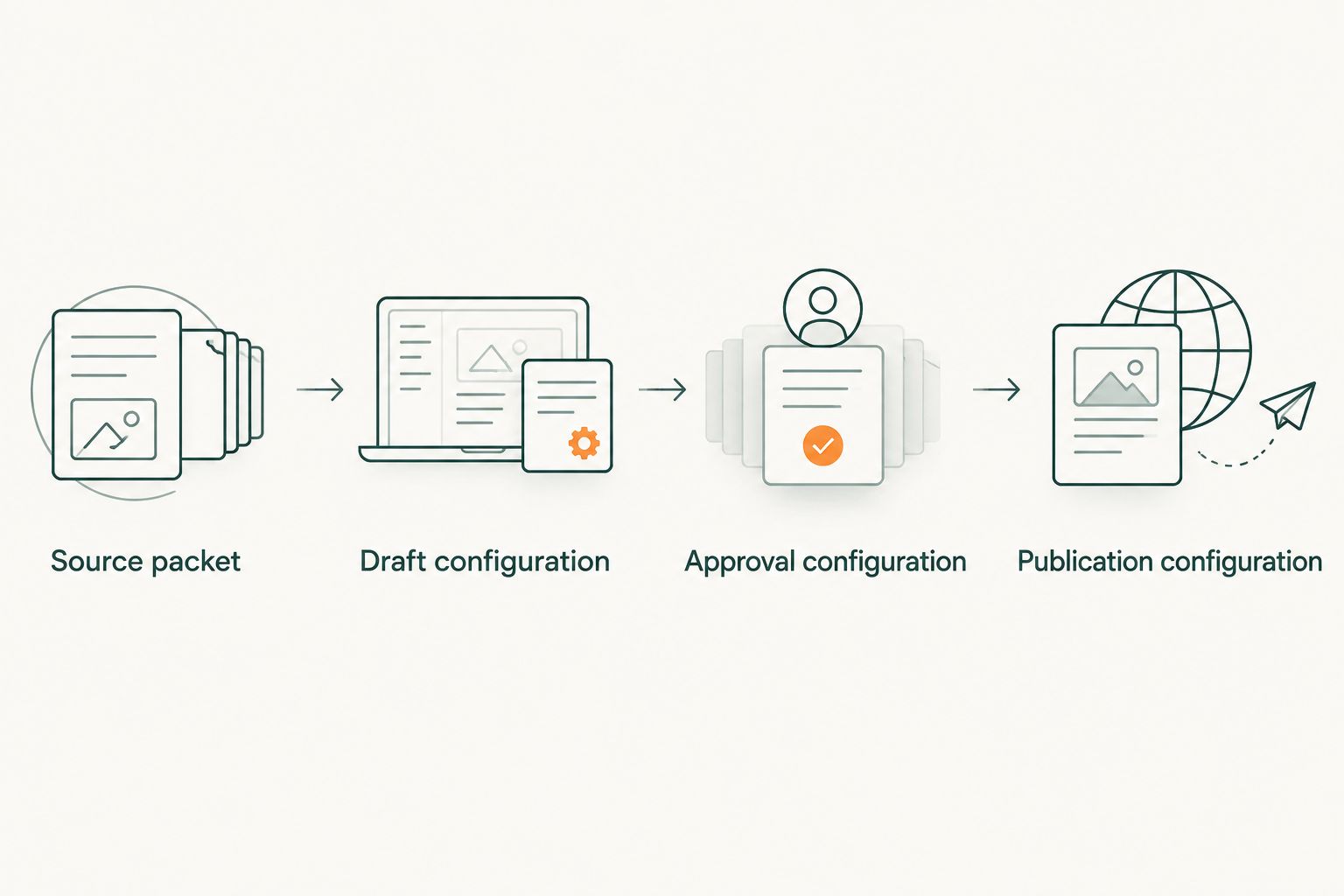
Use this release sequence as the common language between teams: Source packet, Draft configuration, Approval configuration, and Publication configuration. Each stage has an owner and an output; nobody has to infer whether a document is ready.
Variant: update a published case study after a customer call
Use an update workflow when a later conversation adds evidence to an existing story. Do not overwrite the original outcome just because newer notes sound more impressive.
Create an Update record with the proposed change, supporting source, affected passage, and required approver. Compare the new claim with the original measurement scope. A different team, time period, or definition can make two apparently similar results unsuitable for direct comparison.
Choose the workflow according to the editorial job:
| Workflow | Best for | Advantage | Limitation |
|---|---|---|---|
| New case study | A verified customer story without a published version | Builds a coherent account from the full evidence packet | Requires the complete drafting and approval process |
| Existing-story update | New evidence that changes or extends an approved story | Preserves useful context while adding supported information | Needs renewed approval for changed claims and attribution |
For the update workflow, return changed passages to the approval gate. Preserve the previous approved version internally, check the public summary, and confirm that sales materials do not continue repeating a superseded claim.
Your 2026 update policy should distinguish corrections from new outcomes. A corrected attribution fixes the existing record; a later business result needs its own evidence and context.
Troubleshooting
The notes contain goals but no achieved outcome
Stop the case study draft at the evidence stage. Ask the account owner for a customer follow-up focused on what changed after implementation. If no outcome is established, use the material for an internal buyer-insight brief rather than publishing it as proof.
The metric has no definition or measurement period
Request the metric's definition, source, time period, and scope. A number without those details cannot support a precise performance claim. Remove it from the draft until the customer confirms what it measures.
The customer disputes a quote
Remove quotation marks and pause publication of the disputed passage. Return to the source record or ask the speaker to approve revised wording. Do not defend a summary as though it were a verbatim record.
Approval is stuck between marketing and the account owner
Separate factual review from publication permission. Assign an owner to each outstanding decision and send the approver the exact version requiring action. A vague request to review the story creates ambiguity about what approval means.
The published page differs from the approved draft
Compare the headline, summary, quotes, and outcome statements against the approved version. Correct formatting changes that altered meaning; route substantive changes back through approval. Keep the correction in the editorial record so the discrepancy does not recur during reuse.
Customize your workflow
Expand distribution only after the source story is approved. Create a sales summary, an executive post, or a buyer-facing excerpt from the same evidence packet, then check the permissions and factual context for each use.
Gotcatalyst's B2B content marketing work includes executive content, original research, and search visibility programs. Those are different editorial jobs: a customer story explains a specific account, while original research needs a defined research method and evidence beyond that account.
Keep the benefit and the constraint together. Agency support can fit a broader content program, but it does not replace your team's access to customer evidence or the customer's authority to approve publication.
Build your B2B content program
Explore executive content, original research, and search visibility services for SaaS and fintech teams.
FAQ
How do I turn Granola.ai sales call notes into a case study?
Move the notes into an evidence packet, verify the claims, draft the story, obtain customer approval, and publish the approved version. Treat the notes as source material rather than finished proof.
Can I publish a case study from a prospect's sales call?
A prospect's sales call does not establish an achieved customer outcome. Use it to identify buyer problems or follow-up questions, not to claim customer success.
Can I use a quotation from a Granola.ai summary?
Use quotation marks only after verifying the exact wording or obtaining the speaker's explicit approval of the proposed wording. A summarized statement is not automatically a verbatim quote.
Does this workflow require an automated integration?
No, this workflow uses a controlled working document and an editorial handoff. Automation is optional and must preserve evidence, version control, and approval gates.
What should I do when the customer has no numerical result?
Publish only the qualitative outcome the customer can verify and approve. Do not invent a metric to make the story appear more persuasive.
Should I update a case study after another customer call?
Update it when the new call supplies verified information that changes or extends the story. Send changed claims through approval and retain the earlier approved version internally.
Who is Gotcatalyst's content marketing work for?
Gotcatalyst serves hyper-growth B2B SaaS and fintech companies building inbound pipeline through executive content, search visibility, and original research programs. The customer evidence and publication permissions still need accountable owners.
One last thing
The strongest editorial shortcut is deciding what not to publish. Add a Rejected claims field to your working document and record why each claim was removed. That prevents an attractive but unsupported sentence from returning in a sales deck, executive post, or later revision.